 The Lower Eastern Times Opening The Third Eye
Related Articles


If you use an Android phone, you may have noticed your call settings suddenly look different, even without updating anything yourself.
This is because Google has started rolling out a major redesign of its Phone app (version 186+), introducing a new look and smarter features to reduce accidental taps and make calling easier.
WHAT’S NEW
- Simplified tabs: The old four-tab layout (Favorites, Recents, Contacts, Voicemail) has been replaced with three—Home, Keypad, Voicemail.
- Home tab: Shows favorite contacts in a carousel at the top, followed by a detailed call log where each call is listed separately.
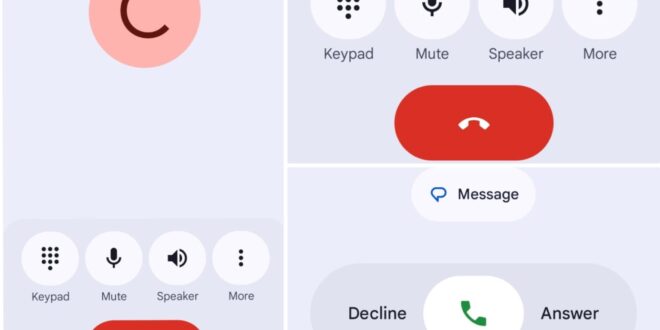
- Incoming call screen: You can now either swipe horizontally (right to accept, left to reject) or use single-tap buttons—meant to cut down on pocket dials.
- Material 3 design: Fresh visuals with pill-shaped buttons, animated contact frames, and a playful, modern look.
- In-call controls: Buttons are larger and morph when pressed, with the “End Call” button now more prominent.
- Navigation drawer: Contacts, call history, settings, and help have been moved into a slide-out menu, accessible from the Home tab.
WHY IT MATTERS
- Fewer accidental calls: New gestures make it harder to mistakenly answer or reject calls.
- Clearer history: Each call is logged separately, making it easier to track missed or repeated calls.
- More modern look: The Material 3 expressive design adds personality and aligns with newer Android versions.
- Streamlined navigation: Consolidated controls and a cleaner layout improve usability.
ROLLOUT STATUS
- Updates are live for stable users on version 186 and above.
- Rollout depends on your device and account, as much of the update is server-driven.
- Beta testers on Android 16 saw it first; others will get it in the coming weeks.
USERS REACT
- Ngetich: “Have you seen the new changes when calling or receiving calls? I know you’ve been checking your settings.”
- SMA Sithick: “Google changed swipe from up/down to left/right… my mom is totally confused. Years of muscle memory gone!”
- Austine: “Used to be vertical swipe, now it’s horizontal. Takes time to adjust.”
- Safiqul Islam: “Why do call settings change across phones without an update? Something’s happening in the background.”
- Khizar: “I noticed it too and thought my settings were tampered with. Now it makes sense.”
HOW TO RESTORE THE OLD LOOK
- Open Google Play Store
- Search for “Phone by Google”
- Open the app’s page
- Tap Uninstall Update
- The previous call screen will be restored
In short: Google’s Phone app refresh is a usability-focused redesign meant to reduce accidental taps and make the interface more modern. While it has left some users disoriented, the update is rolling out gradually, and you can revert to the old style if you prefer.
